ShodhKosh: Journal of Visual and Performing ArtsISSN (Online): 2582-7472
|
|
Cloud-Based Print Management Systems
Dharmesh Dhabliya 1 , Sudhanshu Dev 2
 ,
Dr. R Aroul Canessane 3
,
Dr. R Aroul Canessane 3 ,
Dr. Shashikant Patil 4
,
Dr. Shashikant Patil 4 ,
Vivek Kumar Sharma 5
,
Vivek Kumar Sharma 5 , Sumeet Kaur 6
 ,
Bhupesh Suresh Shukla 7
,
Bhupesh Suresh Shukla 7
1 Vishwakarma Institute of Technology,
Pune, Maharashtra, India
2 Chitkara Centre for Research and
Development, Chitkara University, Himachal Pradesh, Solan, 174103, India
3 Professor, Department of Computer Science and Engineering, Sathyabama Institute of Science and Technology, Chennai, Tamil Nadu, India
4 Professor, UGDX School of Technogy, ATLAS Skill Tech University, Mumbai, Maharashtra, India
5 Assistant Professor, International School of Sciences, Noida University, 203201, India
6 Centre of Research Impact and Outcome, Chitkara University, Rajpura- 140417, Punjab, India
7 Department of Engineering, Science and Humanities, Vishwakarma Institute of Technology, Pune, Maharashtra, 411037, India
|
|
|
ABSTRACT |
|
|
Cloud-Based
Print Management Systems represent a paradigm shift of the old style of
on-shelf print infrastructures to an innovative, scalable, secure, and
cost-effective print systems hosted by the cloud. These systems use cloud
computing to print jobs, user authentication, and device communication
without any complications in various platforms and network environments. The
architecture is usually made up of the following core components which are:
print servers, connectors, clients, and end-user devices and they are built
using standardized workflows and APIs to guarantee that they will be
interoperable with enterprise systems and networks. Some of the main features
are secure print release system, highly developed authentication, smart
routing of print jobs, mobile device-ability, which guarantees flexibility
and access by distributed workforces. Centralized control and compliance
monitoring help organizations to save on capital expenditure, streamline
maintenance, increase scalability levels, and ensure better security. It is
still facing challenges with data privacy, network latency and
interoperability with legacy systems though, and it requires a strong
encryption solution, redundancy plans and deployment choices on a hybrid
basis. The comparative analysis of the top known solutions, namely, Microsoft
Universal Print, Papercut, and PrinterLogic, reveals three different degrees
of scalability, integration with the main enterprise, and compliance
preparedness after Google Cloud Print was discontinued. |
|||
|
Received 28 February 2025 Accepted 26 June 2025 Published 20 December 2025 Corresponding Author Dharmesh
Dhabliya, dharmesh.dhabliya@viit.ac.in DOI 10.29121/shodhkosh.v6.i3s.2025.6816 Funding: This research
received no specific grant from any funding agency in the public, commercial,
or not-for-profit sectors. Copyright: © 2025 The
Author(s). This work is licensed under a Creative Commons
Attribution 4.0 International License. With the
license CC-BY, authors retain the copyright, allowing anyone to download,
reuse, re-print, modify, distribute, and/or copy their contribution. The work
must be properly attributed to its author.
|
|||
|
Keywords: Cloud Printing, Print Management, Secure Print,
Microsoft Universal Print, Print Optimization, Zero-Trust Security |
|||



1. INTRODUCTION
With the fastchanging world of digital transformation, companies are turning to cloud-based applications to streamline their operations, minimize expenses, and increase availability. The Cloud-Based Print Management System (CBPMS) is one such development that has transformed the document workflow processes in the enterprises. Historically, print management used to use complicated on-premises print management infrastructure that comprised special print servers, drivers downloaded to local systems, and manually configured on numerous devices. These systems were expensive and hard to maintain as well as being versatile and inflexible. The move to cloud computing and software-as-a-service (SaaS) models has created an opportunity to bring up a new generation of print management solutions centered around the centralization of control and the ability to simplify workflows and provide on-demand cloud-based printing services Papacharalampopoulos et al. (2022). Cloud-based print management systems serve as a centralized location of managing the print queues, authentication, job routing, and analytics. By using virtualized services that are hosted in the cloud, they will remove the physical print server requirement, which will enable the administrator to monitor and manage activities that are related to printing remotely. These systems can be used to manage smooth communication among users, devices, and printers without considering the geographical location or type of device through the application of APIs, connectors, and cloud gateways Rocha et al. (2021). The architecture that is obtained allows the provision of consistent user experiences across desktops, laptops, and mobile devices and data integrity and adherence to enterprise policies.
The increasing tendency to remote and hybrid working environments has increased the uptake of cloud-based printing even more. Employees should be allowed the freedom to print safely at different places and devices without necessarily being bound to a particular network arrangement. CBPMS meets this requirement by granting user authentication by using single sign-on (SSO), role-based access control, and secure release printing Pan et al. (2021). Through this, these systems promote confidentiality of documents, minimize wastage and increase accountability among workforces that have been distributed. Strategically, cloud-based print management is very beneficial in terms of operations and finances. Organizations will be able to save on their capital investments by removing the physical server requirement, limit the administrative overhead by centralizing their management dashboards and be able to obtain actionable insights based on analytics and reporting tools Yang et al. (2018). In Figure 1, it provides workflow and architecture that is capable of supporting efficient cloud-based print management systems. Moreover, cloud systems can be scaled on demand, so that businesses can add or delete users, printers or functionality accordingly as they grow.
Figure 1
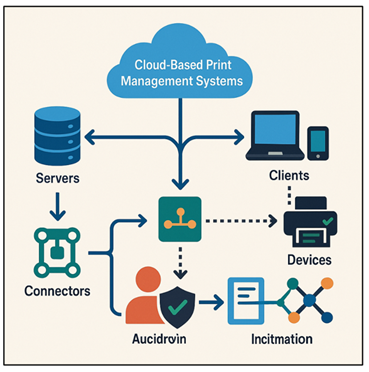
Figure 1 Workflow
and Architecture of Cloud-Based Print Management Systems
These systems also help in achieving the goals of sustainability by maximizing print routes, minimizing paper and ensuring responsible printing practices by enforcing policies. Although cloud based print management systems have numerous benefits, they are also not devoid of challenges. Privacy and security of the network are still important issues of concern, particularly when confidential print data is being transported through a public or a hybrid cloud infrastructure Eshov (2020).
2. Related Work
In the last ten years, the concept of cloud-based print management has been examined by researchers and vendors as a substitute to conventional and more server-based print infrastructures. A particularly interesting research is PrintFlow, which is discussed in a 2025 article, and represents a cloud-based queue management system that allows users to upload documents remotely and access output of partner print shops. The architecture of PrintFlow illustrates the use of cloud printing to assist in automated job scheduling, safe document transmission, and coordination with the already existing print infrastructure, providing scalability and less human intervention Nurlankyzy (2019). Industry perspective In terms of the industry, the recent studies in the market and reports by vendors highlight the way cloud print services upgrade the enterprise printing. Quocirca (as cited in Xerox) in 2023 in an analysis of the cloud-print market, found that, in addition to basic internet-based printing, cloud-based print platforms now have the ability to provide additional print-management functions, such as driver management, rules-based printing, document accounting, tracking, analytics and reporting. This literature underscores the transformation of the traditional print environments to flexible and cloud-native printers, in many cases compelled by the hybrid work-model and distributed business enterprise Ionescu et al. (2021).
These findings are again strengthened by vendor-based analyses (e.g., of Printix and others). The example of Printix supports serverless print infrastructure, Single Sign-On (SSO) using Microsoft Azure AD, and fits with endpoint-management tools, which demonstrates that modern cloud print management can be efficient at scales of heterogeneous device environments and minimize on-premise infrastructure Fulop and Magdas (2022). In the meantime, technical reviews of printing by the cloud management highlight the advantages like centralized control of printers and drivers, remote control, and fleet management across geographic settings, which are a great relief to administrative tasks, as opposed to on-site print servers. Table 1 has summarized both research and commercial developments in cloud-based print management systems. Other larger issues of implementing cloud computing to print services are also communicated in academic and practitioner literature. One of them is the privacy and security of data and compliance assurance when data is sent across the cloud or hybrid nets via print data, particularly sensitive or regulated documents Burova et al. (2021).
Table 1
|
Table 1 Comparative Overview of Research and
Commercial Developments in Cloud-Based Print Management Systems |
|||
|
Focus |
Cloud-native or Hybrid |
Limitations |
Use Cases / Target Users |
|
A cloud-based
queue-management system allowing users to upload documents remotely and
retrieve prints from partner print shops.
Ferreira et al. (2023) |
Cloud-native with connector
to existing infrastructure |
Dependent on partner
print-shop proximity; may not suit private enterprise printing; limited
scalability studies |
On-demand public or shared
printing (e.g. print shops, kiosks, universities) |
|
Full-featured cloud
print-management platform supporting serverless printing, hybrid setups,
multi-OS, remote/mobile printing. Wen and Song (2021) |
Multi-tenant public cloud
(with hybrid support) |
Still needs on-prem
connectors/printer gateways; hybrid complexity when merging legacy
environment |
Enterprises migrating to
cloud, offices with mixed OS/device landscape, hybrid workers, multi-site
organizations |
|
Offers a suite of
cloud-managed and self-hosted print management solutions—from pure SaaS to
private-cloud deployments. |
Hybrid: cloud-native SaaS,
private-cloud or self-hosted options |
Cloud printing requires some
on-premise elements (printers/MFDs) — pure cloud printing remains
constrained. |
Enterprises needing
compliance, data-control, flexible hosting (public or private), hybrid print
environments |
|
Provides cloud-print
services where users can send documents from tablets, PCs, or phones to any
enabled Lexmark printer; includes secure print release, quotas, and fleet
management. Gao (2022) |
Hybrid / Cloud-assisted |
Requires Lexmark-enabled
printers or compatible devices; may not support heterogeneous printer fleets |
Large enterprises using
Lexmark hardware; organizations managing large print fleets with controlled
usage |
|
Provides macro-level
insight: shifting from on-prem print servers to cloud print management;
highlights benefits like flexibility, scalability, and cost-reduction. Antonio (2020) |
Public cloud / Hybrid |
Also notes security,
availability and performance concerns; suggests hybrid models remain common |
Companies evaluating
cloud-print adoption; IT decision-makers assessing infrastructure
transformation |
|
Discusses smooth transition
from legacy on-premise infrastructure to cloud-enabled or hybrid print,
highlighting challenges and best practices.
Liu (2023) |
Hybrid primarily |
Points out integration
complexity; need for API support; possible compatibility issues with legacy
printers |
Organizations transitioning
gradually—e.g. moving parts of print infrastructure to cloud while retaining
some legacy systems |
|
Demonstrates practical
benefits: reduced cost, easier administration, remote printing across
distributed sites, mixed device support. |
Public-cloud SaaS (with
hybrid when needed) |
Case-specific: results may
vary; dependent on network, printer compatibility, user training |
Multi-national corporations,
educational institutions, retail chains with many branches |
3. Architecture of Cloud-Based Print Management Systems
3.1. System components (servers, connectors, clients, devices)
The Cloud-Based Print Management System (CBPMS) architecture comprises a number of components that are connected and collaborate to facilitate effective, secure and scalable print operations. In essence, the cloud print server is the central unit of control where the management console, the authentication service, the job schedule and analytics are found. It doesn't require the use of traditional on-premise servers and instead virtualizes print capabilities in a safe and multi-tenant cloud platform. Connectors are used as middlemen, which connect local print networks with the cloud Dan (2023). They provide a smooth channel between the organization infrastructure and the cloud system and usually multi operating systems are supported as well as printer protocols. Connectors do driver translation, data encryption, job forwarding and legacy devices can be connected to the modern environment. Clients- desktop agents and web interfaces and mobile apps adversely affect end-users by offering them access to printing services. They provide the option of users submitting jobs remotely and checking on print queues as well as authenticate using single sign-on (SSO) or identity providers such as Azure AD or Google Workspace. The output nodes are printers and multifunction devices (MFDs), which have embedded print agents, or to which a network protocol (IPP, LPD) is attached.
3.2. Workflow and Data Flow Models
A Cloud-Based Print Management System has its workflow which starts when the user triggers a print job on a device he or she is connected to (desktop, laptop, or mobile application). The spooled document is encrypted locally and then the encrypted document is transferred to the cloud print service in a secure manner (with secure transport protocols HTTPS or IPPS). The cloud server identifies the user through the identity provider of the organization and implements the pre-determined print policies including duplex printing, color restrictions, or quota restrictions Ji et al. (2023). Upon validation, the system directs the job to the print connector which is a lightweight service that runs on the organization network and identifies the best printer depending on its proximity, availability, load balancing, or user preferences. This connector interprets the print information and transmits the information to the specific printer via the local network protocols. The data flow is streamlined, client, encryption, cloud queue, authentication, routing and the output device. In the process, analytics and auditing data like user ID, job type, and a timestamp are recorded. The user is able to release the job via secure interface or device-level authentication (PIN, card or biometric). This process guarantees confidentiality, efficient routing and responsibility of the data.
3.3. Integration with Network and Enterprise Systems
An effective Cloud-Based Print Management System (CBPMS) should be built to work in sync with the enterprise IT ecosystems to provide a single control and security. Integration incorporates mainly network connectivity, identity management and enterprise applications. Within the framework of networking, the system uses hybrid communication models that span between local printers and cloud servers on the basis of secure VPNs, IPsec tunnels, or zero-trust network access (ZTNA) systems. This provides reliability when using print jobs as they will go through without the internal devices being exposed to other threats. The ability to be integrated with directory services like Microsoft Active Directory (AD) or Azure AD will enable centralized authentication, which will mean that users can use their current enterprise credentials and policies to do access control. CBPMS also connects with the enterprise resource planning (ERP), document management systems (DMS), and workflow automation systems to automate the document procedures. As an example, an ERP can automatically send invoices to secure print queues and scanned documents can be uploaded to cloud file storage or ECM (Enterprise Content Management) systems such as SharePoint or Google Drive. Figure 2 shows integration between cloud print management to network and enterprise systems.
Figure 2
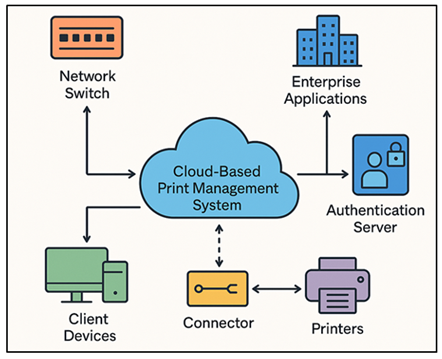
Figure 2 Integration
of Cloud-Based Print Management Systems with Network and Enterprise Systems
4. Key Features and Functionalities
4.1. Secure print and authentication mechanisms
Cloud-Based Print Management Systems (CBPMS) use security as a pillar to make sure that sensitive documents are safe during the entire process of printing. Secure print release is also a major feature whereby print jobs are stored in an encrypted cloud queue until the user logs in at the printer thus avoiding unauthorized access to confidential contents. To authenticate, one may use a PIN code, ID card, biometrics or Single Sign-On (SSO) along with identity providers like Microsoft Azure AD, Google Workspace or Okta. CBPMS uses end to end encryption usually AES-256 and TLS to protect data sent across the network and stored data. This eliminates the chances of interception or manipulation of the print data between the clients, connectors, and printers. Moreover, administrators may establish role-based access control (RBAC) to specify printing rights, use colors or use certain printers depending on user roles or department. Audit trail and logging also contribute to a higher level of accountability since it checks the source, the destination and the usage of each print job. Multi-factor authentication (MFA) is also enabled in many systems to achieve increased security, especially in controlled sectors, such as the healthcare system and the financial sector. Zero-trust integration The integration with zero-trust security frameworks will make sure that all print transactions are authenticated prior to execution.
4.2. Print Job Routing and Optimization
Cloud-based print management requires efficient routing and optimization of print jobs to achieve the maximum output and least possible costs. The system dynamically analyzes the print requests and decides on the most appropriate printer considering the factors relating to proximity, devices conditions, distribution of workload, and pre-established organizational policies. This smart routing will guarantee efficient use of printers that will cause fewer bottlenecks and downtime in the print network. Modern CBPMS techniques also use load-balancing algorithms to evenly distribute print jobs across the devices that are available to enhance the speed and productivity. Also, the policy based routing will enable the administrators to impose restrictions like defaulting large documents to a high capacity printer or directing the color jobs to a cheaper monochrome printer. Optimization is not only in routing, but also on bandwidth, compression and spooling efficiency. These characteristics reduce the latency and provide uniform performance of printing even when operating in a remote or low-bandwidth condition. Print job caching and deduplication are also supported by the system, and they minimize the network load and the server demand. Certain platforms use AI and predictive analytics to track pattern of use, anticipate malfunction of printers and suggest cost-cutting steps. An example is the analytics can be able to detect idle printers or color printing trends and direct procurement and sustainability programs.
4.3. Multi-Platform and Mobile Device Support
The enterprises of the modern world are dependent on the various device ecosystems, and multi-platform and mobile compatibility is a highly important characteristic of Cloud-Based Print Management Systems (CBPMS). They will be compatible with Windows, macOS, Linux, and mobile operating systems including Android and iOS, and will offer a similar experience of print services without dependence on the type or location of a device. Users are able to start and control print jobs through web portals, mobile apps or built-in printer interfaces, which allow actual flexibility in hybrid and remote working environments. Cloud connectors offer driverless printing with standards such as IPP Everywhere, Google Web Print, or Microsoft Universal Print so no longer local printer drivers are required. Mobile support allows the employees to upload documents to the cloud queue and release them on-demand either by scanning the QR codes at a printer or by printing securely using smartphones or tablets. The compliance, security of devices, and restricted access to corporate print resources are guaranteed with the integration with the enterprise mobile management (EMM) and mobile device management (MDM) solutions. Moreover, CBPMS environments are likely to be enabled to BYOD (Bring Your Own Device) so as to allow contractors and remote workers to print safely without the need to connect to internal networks.
5. Benefits of Cloud-Based Print Management
5.1. Cost reduction and operational efficiency
Costs reduction and enhancement in operation efficiency is one of the greatest benefits of Cloud-Based Print Management Systems (CBPMS). Conventional print setups demand dedicated servers, on-site driver installations and manual maintenance, which are all factors that make them costly in terms of initial capital and operational costs. Moving those functions to the cloud, organizations can remove the necessity of having on-premise print servers, decrease the investments in hardware, and decrease the overheads of maintaining IT. Cloud print management solutions utilize centralized management, which enables the IT teams to operate users, devices, and policies through a single dashboard. This saves time as well as reduces the load in troubleshooting driver conflicts and print queue errors. Efforts are also made to automate updates and monitoring of the device remotely to ensure the maximisation of uptime without any manual intervention. Additionally, the usage analytics and reporting tools allow determining which devices are underutilized or overprinting colors to make an informed decision on cost control. Figure 3 demonstrates that cloud print management is more efficient and it can save a lot of money. It can save up to 30-50 on paper and toner use by means of rules-driven printing, duplex enforcement and job accounting.
Figure 3
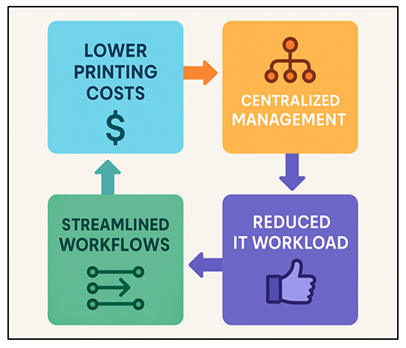
Figure 3 Cost
Reduction and Operational Efficiency in Cloud-Based Print Management Systems
Work agility also enhances because the employees can be able to print securely anywhere without using complex VPNs and local network reliance. Less infrastructure and automation, as well as resource utilization, are a combination of lowered infrastructure and resource utilization, which is measurably translated into savings and more sustainable and high-performing print ecosystems that meet the modern demands of the enterprise.
5.2. Scalability and Flexibility for Organizations
The Cloud-Based Print Management Systems (CBPMS) offer unmatched scalability and flexibility that enables the organization to respond swiftly to the changing business requirements. Conventional print systems cannot easily support expansion, and hardware upgrades and multifaceted setups are expensive. By contrast, the cloud-based systems are run on elastic designs, which allows the administrator to add a new user, printer, or location in minutes without needing to install more servers or drivers. The scalability has been noted to be especially useful to both multi-site and global organizations, where it is essential to have a similarity in the print environment across different regions. With centralized cloud control, IT departments could implement consistent print policies, performance monitoring as well as enforce compliance with all branches.
5.3. Enhanced Security and Compliance Capabilities
Sensitive information is an area that businesses are worried about security and regulatory compliance, and Cloud-Based Print Management Systems (CBPMS) provide solid frameworks to deal with both. These are based on the zero-trust principles where all the users, devices, and print documents are authenticated, authorized, and encrypted before actions are performed. Documents are not intercepted or accessed by unauthorized parties in transit and storage because of the end-to-end encryption (AES-256/TLS) and secure print release functionality. The system also has multi-factor authentication (MFA), role-based access control (RBAC) and audit logging that enhance the defensive posture of the system in that only authenticated users view confidential print materials. With regard to compliance, the major CBPMS platforms are compliant with international standards and data protection acts, including GDPR, HIPAA, ISO 27001, and SOC 2. Inbuilt reporting and auditing functionality gives it traceability and makes it easier to prove compliance when performing internal or external audit.
6. Challenges and Risks
6.1. Data privacy and security concerns
Although Cloud-Based Print Management Systems (CBPMS) have numerous benefits, they have a major data privacy and security risk that should be handled attentively. Since the print data passes through and is stored in the cloud facilities, it can be intercepted, accessed illegally, or leak out unless proper measures exist. Confidential data may be presented in sensitive documents which may include financial reports, medical records or legal contracts, in case of a leakage of this information, it may lead to regulatory fines or even damage to reputation. The main threats to the security are caused by the transmission of data, its storage, and policy of user authentication. Lack of adequate encryption, access restriction, or incorrect cloud settings can result in possible breach of the print information. Also, cloud platforms can be of a multi-tenant type, which can indicate a lack of privacy among organizations using the infrastructure with other customers. The regulatory compliances make the situation even more complicated since any enterprise should follow such frameworks as GDPR, HIPAA or ISO 27001 that provide strict regulations regarding data processing and storage. Lack of alignment between the policies of cloud service providers and the compliance needs of an organization may result in the audit gaps. The organizations are advised to deploy end-to-end encryption, multi-factor authentication, secure print release and secure access policies to reduce these risks.
6.2. Network Dependency and Latency Issues
One of the inherent issues about Cloud-Based Print Management Systems (CBPMS) is that it is extremely dependent on network connectivity and performance. The fact that all print jobs are sent to cloud servers implies that any form of network failure either due to a lack of internet bandwidth or latency or internet outages can disrupt the printing services. The dependency may be especially intricate in the case of the organizations that are situated in the areas with unstable or slow internet infrastructure. The large file transfer, authentication, or spooling and transfering jobs to cloud servers can have latency problems. These can cause a frustrating user experience and productivity, particularly when printing in large volumes as in a school, hospital, or corporate office. Moreover, the job may fail or fail to deliver prints due to congestion in the network or overloaded routers.
Figure 4
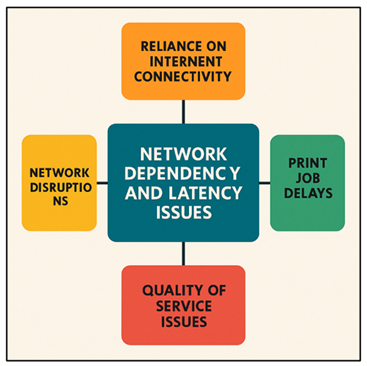
Figure 4 Network Dependency and Latency
Issues in Cloud-Based Print Management Systems
Figure 4 brings into focus network dependency and latency issues in print management systems in the cloud. To decrease the risks of this, the contemporary CBPMS developers use bandwidth optimization, compression, and edge caching technologies. Hybrid architectures which have print data processing at local level but are operated by the cloud can decrease the latency and ensure functionality when the internet is interrupted.
6.3. Integration Challenges with Legacy Systems
When it comes to integrating Cloud-Based Print Management Systems (CBPMS) with print infrastructures that need a legacy system, the task is quite challenging in technical and operational aspects. Most organizations are still using old printers, proprietary drivers, and old software systems that were never programmed to work with the cloud. Consequently, the realization of a smooth interoperability between emerging cloud platforms and the current hardware may demand a lot of customization or further middle software. The devices used long ago might not support newer standards like IPP (Internet Printing Protocol) or secure print release system, so they can only exchange information with cloud applications to a limited degree. When this happens, organizations will be forced to install on-premise connectors or print gateways to manage the transition- this will add complexity and possible points of failure. Enterprise resource planning (ERP), document management systems (DMS) and local-dir based authentication frameworks are other compatibility issues.
7. Comparative Analysis of Leading Cloud Print Solutions
7.1. Google Cloud Print alternatives
There has been a transition to various contemporary options with the elimination of Google Cloud Print (GCP) in which organizations are trying to substitute the void left by GCP. Cloud-print solutions have now stronger, enterprise-level print-management and print-release functionalities - as compared to GCP, which was more of a cross-device, driverless printing interface. The current platforms are not limited to the remote printing. They provide controlled print queues, centralized management, authentication of users, monitoring of user usage, enforcement of policies and the possibility of deploying in a hybrid nature (cloud with on-premise connectors). The aspect of security, compliance, print-management features, and integration with identity and enterprise-IT infrastructure are some of the factors that organizations considering GCP alternatives need to consider now, something that GCP previously supported only partially. In brief: whereas GCP focused on device agnostic printing and the ease of use of a person or small team, the contemporary options aim at providing full print-management lifecycle support, such as secure release, auditability, device management, and scalability that an enterprise should have.
7.2. Microsoft Universal Print
The most mainstream successor to GCP which is used in organizations which are typically based on the use of Microsoft centric environments is arguably Microsoft universal print (UP). UP eliminates the physical print servers, manages print queues, authenticates users and releases print through the cloud, on the same platform as Microsoft 365 and Azure. One of the key benefits is driverless printing: UP supports printers that are compatible with the so-called Universal Printready printers or a small connector with legacy printers. This makes it easy to deploy and saves on maintenance costs by IT administrators. Universal Print provides a smooth, unified printing experience to Windows - and increasingly to macOS, mobile, and mixed-device operating systems - and is therefore appropriate in the organizations that require low-effort cloud-native printing infrastructure that is involved with their Microsoft identity and collaboration stack. UP is however prone to miss certain advanced print-management functions that other enterprises might need.
8. Conclusion
Cloud-Based Print Management Systems (CBPMS) have become an innovation in advancement of print infrastructure in the enterprise, in line with the general move toward digitalization and cloud computing. Eliminating the reliance on traditional print servers and decentralizing operations these systems offer organizations an efficient and secure and scalable execution of the management of print workflows in geographically dispersed settings. Due to the integration of cloud technologies, centralized control becomes possible, better visibility is provided, and real-time analytics can be implemented, which improves the efficiency of the administration of all organizations and the convenience of end-users. The existing advantages of CBPMS are not limited to cost-cutting and efficiency in operations; this concept has brought flexibility, sustainability, and enhanced adherence to the emerging data protection regulations. In order to protect confidential information, secure authentication, encryption and policy-based management are all that will keep confidential information safe during the printing lifecycle. Besides, cloud-based solutions are flexible and, thus, qualify well in the hybrid and remote work scenarios; in this situation, accessibility and safety need to go hand in hand. Regardless of these benefits, there are still challenges facing the network, like risk of data privacy, network dependency, and integration of the legacy systems.
CONFLICT OF INTERESTS
None.
ACKNOWLEDGMENTS
None.
REFERENCES
Antonio, C. C. (2020). High Performance Computing for Big Data in Distributed Systems. Distributed Processing Systems, 1(2), 10–17. https://doi.org/10.38007/DPS.2020.010202
Burova, E., Grishunin, S., Suloeva, S., and Stepanchuk, A. (2021). The Cost Management of Innovative Products in an Industrial Enterprise Given the Risks in the Digital economy. International Journal of Technology, 12(7), 1339–1348. https://doi.org/10.14716/ijtech.v12i7.5333
Dan, H. (2023). Exploring the Innovative Path of Human Resources Management of Construction Enterprises in the Internet Plus Era. Modern Economics and Management, 4(1), 63–65.
Eshov, M. A. N. S. U. R. (2020). Influence Assessment of Enterprise Management Value Based on Coefficients Methods Under the Risk Conditions. Advances in Mathematics: Scientific Journal, 9(9), 7573–7598. https://doi.org/10.37418/amsj.9.9.104
Ferreira, J. J., Lopes, J. M., Gomes, S., and Rammal, H. G. (2023). Industry 4.0 Implementation: Environmental and Social Sustainability in Manufacturing Multinational enterprises. Journal of Cleaner Production, 404, 136841. https://doi.org/10.1016/j.jclepro.2023.136841
Fulop, M. T., and Magdas, N. (2022). Opportunities and Challenges in the Accounting Profession Based on the Digitalization Process. European JOurnal of Accounting, Finance and Business, 10(2), 38–45. https://doi.org/10.4316/EJAFB.2022.1025
Gao, J. (2022). Analysis of Enterprise Financial Accounting Information Management from the Perspective of Big Data. International Journal of Scientific Research, 11(5), 1272–1276. https://doi.org/10.21275/SR22514203358
Ionescu, C. A., Fülöp, M. T., Topor, D. I., Căpușneanu, S., Breaz, T. O., Stănescu, S. G., and Coman, M. D. (2021). The New Era of Business Digitization through the Implementation of 5G Technology in Romania. Sustainability, 13(23), 13401. https://doi.org/10.3390/su132313401
Ji, Y., Zhou, X., and Zhang, Q.
(2023). Digital Transformation and Enterprise
Innovation: An Analysis from the Perspective Of Randd Investment and RandD
efficiency. Financial Research, 514, 111–129.
Liu, P. (2023). The Application of Big Data Technology in Enterprise Information management. Electronics, Communication and Computer Science, 5(1), 56–58.
Nurlankyzy, N. A. (2019). Business Process as the Basis of the Process Approach in Enterprise Management. International Journal of Engineering and Management Research, 9(2), 166–170. https://doi.org/10.31033/ijemr.9.2.22
Pan, S., Trentesaux, D., McFarlane, D., Montreuil, B., Ballot, E., and Huang, G. Q. (2021). Digital Interoperability in Logistics and Supply Chain Management: State-of-the-Art and Research Avenues Towards Physical Internet. Computers in Industry, 128, 103435. https://doi.org/10.1016/j.compind.2021.103435
Papacharalampopoulos, A., Tzimanis, K., and Stavropoulos, P. (2022). A Decision Support Tool for Dynamic LCA: The FDM Paradigm. Procedia CIRP, 112, 543–548. https://doi.org/10.1016/j.procir.2022.09.097
Rocha, A. D., Freitas, N., Alemão, D., Guedes, M., Martins, R., and Barata, J. (2021). Event-Driven Interoperable Manufacturing Ecosystem for energy consumption monitoring. Energies, 14(12), 3620. https://doi.org/10.3390/en14123620
Wen, H., Lee, C. C., and Song, Z. (2021). Digitalization and Environment: How does ICT Affect Enterprise Environmental Performance? Environmental Science and Pollution Research, 28(36), 54826–54841. https://doi.org/10.1007/s11356-021-14474-5
Yang, X., Qian, C., and Zhu, F. (2018). A Method for Evaluating Big Data Service Resources Based on Cloud Computing. Computer Science, 45(2), 295–299.
|
|
 This work is licensed under a: Creative Commons Attribution 4.0 International License
© ShodhKosh 2025. All Rights Reserved.